In today’s hybrid world, a reliable USB webcam with a built-in microphone is essential for clear meetings, seamless streaming, and engaging online classes. This guide highlights five top options from Logitech, NexiGo, and EMEET that balance sharp video, clear audio, and straightforward setup. Each selection is evaluated for office use, home learning, and content creation, with practical notes on privacy features, software controls, and compatibility.
| Product | Brand | Resolution | Built-in Mic | Key Highlights |
|---|---|---|---|---|
| Logitech Brio 101 Full HD Webcam | Logitech | 1080p | Yes | RightLight, Privacy Shutter, USB-A |
| NexiGo N60 1080P Webcam | NexiGo | 1080p | Yes | 110° FOV, Software Control, Privacy Cover |
| EMEET C950 1080P Webcam | EMEET | 1080p | Yes | Privacy Cover, Low-Light Correction, 70° View |
| EMEET C960 1080P Webcam | EMEET | 1080p | Yes | 2 Noise-Reduction Mics, 90° FOV, Privacy Cover |
| Logitech C920e HD 1080p Mic-Enabled Webcam | Logitech | 1080p | Yes | 1280 x 720 FOV, Auto Focus, Zoom Certified |
Logitech Brio 101 Full HD Webcam

The Logitech Brio 101 is a USB webcam designed for meetings, streaming, and everyday desktop use. It delivers Full HD 1080p video with a built-in microphone for clear audio during calls. The camera includes RightLight Auto Light Balance to boost brightness and reduce shadows, ensuring you look your best in mixed lighting. A privacy shutter provides a physical cover when the camera is not in use, and it connects via USB-A for quick plug-and-play setup. Compatibility covers popular platforms like Teams and Zoom, making it a practical option for office teams and remote workers. The device is noted for compact design and reliable color balance in varying environments.
In practice, the Brio 101 supports everyday videoconferencing with straightforward controls and privacy options. The integrated microphone is designed for standard office environments, and the RightLight feature helps mitigate backlight and dim lighting. For content creators who need quick, reliable video without adding extra gear, this webcam offers a balanced combination of quality and simplicity. While it focuses on 1080p performance, it remains a solid choice for users prioritizing consistency, privacy, and compatibility over high-end features.
NexiGo N60 1080P Webcam

The NexiGo N60 webcam offers 1080p video with a wide-angle perspective and practical software support. A fixed focal length lens provides a broad 110° field of view, suitable for presentations and group calls. The camera supports easy plug-and-play via USB, and users can adjust exposure and FOV through NexiGo’s software to tailor the image for their workspace. A built-in noise-cancelling microphone helps reduce ambient noise during calls, contributing to clearer communication in busy environments. The package targets users who want clear video and reliable audio without needing extensive setup or external accessories.
For classrooms, home offices, or small meeting rooms, the N60 delivers a straightforward balance of wide coverage and dependable audio. The 110° view helps keep teammates in frame during multi-person discussions, while the software controls provide flexibility for lighting and exposure. It’s a practical choice for users seeking a cost-effective solution with solid performance, especially when streaming or recording presentations where audio clarity matters as much as video sharpness.
EMEET C950 1080P Webcam

The EMEET C950 webcam prioritizes privacy and image quality at 1080p. It features a physical privacy cover that slides to block the lens, helping protect against accidental filming. The camera uses a 2MP sensor with low-light correction to deliver clearer video, especially in suboptimal lighting conditions. The C950 offers 30fps video with adjustable exposure and color parameters via EMEET’s software, enabling users to fine-tune brightness and contrast. A 70° field of view keeps shots focused on the user, which is ideal for personal conferences, online classes, and professional video calls written for desktop or laptop use.
With its privacy-first design and software-assisted image tuning, the C950 suits users who want straightforward plug-and-play setup combined with practical privacy controls. It remains suitable for students, teachers, or professionals who value clean visuals and a compact form factor, without requiring additional peripherals or complex installation steps.
EMEET C960 1080P Webcam
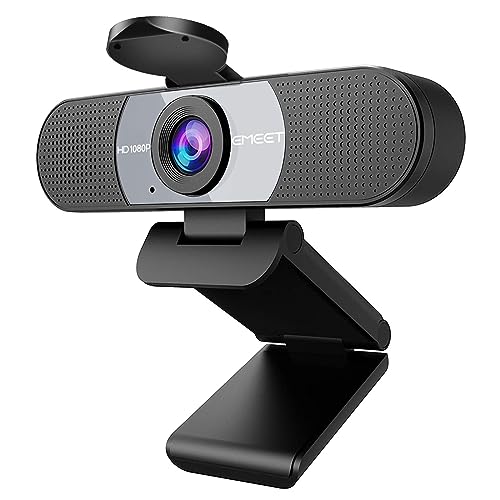
The EMEET C960 is a 1080p webcam built for calls and conferencing, featuring two noise-reducing microphones and a 90° field of view. The dual mics help capture clearer audio while reducing background noise, making it suitable for meetings in home offices or small conference spaces. Privacy protection is standard via a built-in cover, and the webcam supports plug-and-play USB connection for easy setup across Windows, macOS, and other platforms. The fixed focus delivers dependable sharpness within a practical working distance, while automatic low-light correction helps maintain visibility in dim environments.
Educators, remote teams, and streamers can benefit from the C960’s balanced mix of wide but not exaggerated framing, reliable audio, and privacy features. The device’s software options allow users to adjust brightness and exposure for consistent results across different lighting conditions, providing a reliable, all-around webcam for everyday online communication and content creation.
Logitech C920e HD 1080p Mic-Enabled Webcam

The Logitech C920e is a well-established 1080p webcam with built-in microphones and automatic light correction. It provides a reliable field of view, typically around 78°, which keeps you centered in frame while allowing space for shared content or screens during calls. Two integrated omnidirectional microphones capture audio clearly from moderate distances, supporting natural voice pickup in typical home or office setups. The camera’s autofocus ensures consistent sharpness as you move, while the light correction helps you look better in varying lighting conditions. It is certified for Zoom and Microsoft Teams, making it a dependable choice for professional environments.
For users who prioritize credibility and compatibility, the C920e offers a familiar, proven option with solid video quality and dependable audio. It suits corporate settings, educators, and content creators who want a straightforward plug-and-play solution that integrates smoothly with major video platforms and standard hardware setups.
Buying Guide
When selecting a USB webcam with a mic, consider how you will use it most often—meetings, teaching, streaming, or a mix of these. This guide highlights key purchase considerations and compares common configurations to help you choose the right balance of video quality, audio clarity, privacy, and ease of use.
Video quality and frame rate
1080p at 30fps is a common baseline that provides sharp images with smooth motion for most video calls. Some models offer higher resolutions or 60fps, but that can demand more bandwidth and processing power. For documentary-style or streaming content, 1080p at 30fps is typically adequate; 4K can provide extra detail but may require more powerful hardware and software support for your chosen platform.
Microphone design and audio quality
Webcams vary from single mics to dual or multi-mic arrays with noise suppression. If audio quality is critical (podcasts, teaching, or large meetings), look for dual mics or dedicated noise-cancelling arrays. Built-in mics are convenient, but external microphones can offer richer sound if you frequently record or stream in noisy environments.
Field of view and privacy
Field of view (FOV) ranges from about 70° to 110°. A wide FOV captures more of the surroundings, which is useful for group chats but can reveal clutter. If privacy is a priority, consider cameras with a physical privacy cover or a discreet sliding shade to block the lens when not in use.
Low-light performance
Low-light correction and HDR-like features help you stay visible in dim rooms. Look for cameras with automatic exposure adjustments that improve visibility without overexposing brighter areas, essential for evening calls or rooms with mixed lighting.
Software features and platform compatibility
Software controls can adjust exposure, white balance, and brightness, sometimes via manufacturer apps. Compatibility with Zoom, Teams, Skype, OBS, and other platforms is essential for seamless use across devices. USB-A versus USB-C matters depending on your computer’s ports; some cameras rely on USB-A, while others offer USB-C or both for broader compatibility.
Privacy, security, and mounting options
Privacy covers are increasingly common and protect against unintended surveillance. Consider mounting solutions (clip-on, tripod-ready, or monitor-mitting) to fit your workspace. If you travel or switch between desks, portability and stability become practical considerations.
Use-case perspectives
- Business professionals: Favor reliable autofocus, broad compatibility, privacy features, and consistent color rendering for meetings and presentations.
- Educators and students: Prioritize easy setup, clear mic pickup, and good low-light performance for online classrooms and tutoring sessions.
- Content creators and streamers: Look for higher frame rates, good mics, flexible FOV, and software controls for customization and recording workflows.
- General home use: Balance price, ease of use, and solid performance for everyday video chats and casual streaming.
Across these models, you’ll typically find a strong baseline of 1080p video, built-in mics, privacy covers, and USB connectivity. The right choice depends on your environment, your preferred platforms, and how much emphasis you place on privacy versus advanced features. The five options described here provide solid starting points for different needs—from business-grade reliability to budget-friendly convenience—while keeping the setup simple and straightforward for American readers seeking dependable USB cameras with integrated microphones.