Answering the need for clear, high-resolution video, these USB webcams cover common uses from online classes to professional video calls and live streaming. This guide highlights five strong options across 1080p and 4K capabilities, with guidance on who each model fits best. Whether you’re a student, remote worker, or content creator, you’ll find an option that balances image quality, ease of use, and features.
| Product | Best For | Resolution |
|---|---|---|
| Xweiryn Webcam for PC | Online classes, meetings, casual streaming | 1080p |
| Lenovo Essential FHD Webcam Gen 2 | Professional calls, family/video chats | 1080p |
| HP 320 FHD Webcam | Desk setups, Zoom/Teams on desktop or laptop | 1080p |
| 4K Webcam, HD Webcam 8MP (ZIQIAN) | High-detail streaming and recording | 4K/1080p |
| j5create USB Streaming Webcam | Conferencing and education with wide view | 1080p |
Xweiryn Webcam for PC — 1080p USB Plug-and-Play

The Xweiryn webcam delivers 1080p video at up to 30 frames per second, suitable for everyday video calls, online classes, and live streaming. It’s a plug-and-play device, requiring no drivers, and is compatible with popular platforms such as Zoom, Teams, FaceTime, Google Meet, and YouTube. This model is best for general use on desktops or laptops where quick setup matters more than advanced optics.
Best for: Students and remote workers who want a straightforward, reliable 1080p option with broad platform compatibility.
Caution: While convenient, it does not specify advanced features like built-in privacy shutters or multiple mic options, which some users value for privacy and audio clarity.
Lenovo Essential FHD Webcam Gen 2 — Dual Microphones

The Lenovo Essential FHD Webcam Gen 2 offers 1080p video with dual built-in microphones for clearer voice pickup and a 85-degree field of view. A built-in privacy shutter adds a quick off-switch when not in use. The combination of solid image quality and privacy features makes this a strong choice for professional meetings at home or in the office.
Best for: Professionals who want trustworthy 1080p video with improved audio and easy privacy control.
Caution: An 85-degree FOV is practical, but wider rooms may benefit from a broader angle or external microphone in some setups.
HP 320 FHD Webcam — Privacy Cover and Wide FOV

The HP 320 webcam emphasizes easy setup and broad platform compatibility with 1080p resolution, a 66-degree wide-angle view for natural conversations, and a physical privacy cover. It’s designed to work smoothly with Zoom and Teams, making it a solid fit for everyday business or study sessions on desktop or laptop.
Best for: Users who want a simple, secure 1080p webcam with a privacy feature and native compatibility with major platforms.
Caution: The 66-degree field of view is narrower than some multi-person setups, so it’s less ideal for wide group calls without external adjustments.
4K Webcam by ZIQIAN — 8MP with Privacy

The ZIQIAN 4K webcam targets creators who demand high detail, offering 4K 30fps with 8MP resolution and a 75-degree wide-angle lens. It includes a privacy shutter and built-in microphone, though the description notes 4K quality while also mentioning full HD 1080p capabilities, which can be a practical flexibility for some workflows.
Best for: Content creators and professionals who want sharp 4K output for streaming or recordings, with a built-in mic and privacy control.
Caution: Some users might experience the need for compatible software or drivers for full 4K performance on certain systems; verify platform support before purchase.
j5create USB Streaming Webcam — 360° Rotation
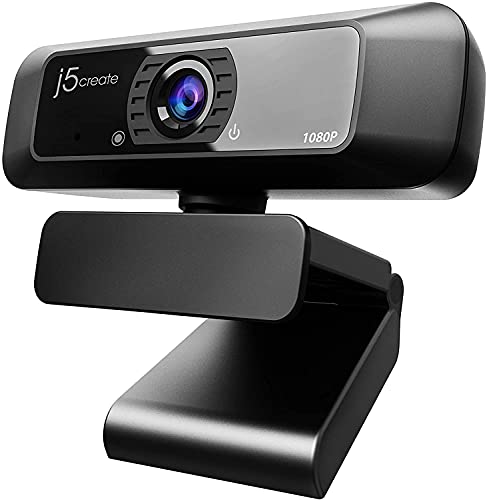
The j5create USB Streaming Webcam offers 1080p video with a 360-degree rotation and a built-in high-fidelity microphone. It is intended for PC, Mac, and various devices, supporting Zoom, YouTube, and FaceTime. This model is best for users who want flexible angles for presentations or classroom-style setups and prefer plug-and-play simplicity.
Best for: Users who need versatile camera angles for meetings or streaming and value an integrated microphone for basic audio capture.
Caution: The mic may not be fully compatible with some Chrome OS or Chromebook setups, so check platform requirements if you rely on that ecosystem.
IFWATER 20MP USB Camera — 4K for Professional Use

The IFWATER camera targets high-resolution needs with a 20MP sensor and 4K capability at 30fps, along with a 95-degree wide-angle lens. It supports USB3.0 Type-C for fast transmission and is suitable for industrial or professional capture where image fidelity matters. It presents a broader feature set for specialized applications beyond plain video calls.
Best for: Professionals seeking high-resolution UVC capture for monitoring, inspection, or high-detail streaming in controlled environments.
Caution: The 4K/30fps performance can be constrained by system bandwidth on older machines; ensure USB-C/USB3.0 availability and compatible software.
Buying Guide: Key Considerations for High-Resolution USB Webcams
- Resolution and frame rate: For clear video, aim for 1080p at 30fps as a baseline, or 4K if you need ultra detail and have appropriate processing power.
- Field of view: 66° to 85° is common for desk setups; wider angles are better for group calls but can distort faces if too wide.
- Microphones: Built-in mics help, but consider external mics for better voice clarity in noisy environments.
- Privacy features: A physical shutter or switch adds a straightforward privacy option when not in use.
- Plug-and-play vs. drivers: USB plug-and-play reduces setup time; some higher-end models may offer additional software features that require drivers.
- Platform compatibility: Verify compatibility with Zoom, Teams, Google Meet, YouTube, FaceTime, etc., especially if you use niche systems.
- Mounting and placement: Clip-on, tripod-ready, and 360° rotation capabilities affect where you place the camera and how you frame subjects.
- Compatibility with operating systems: Windows, macOS, and some Linux or Chrome OS environments may have varying support; check requirements.
- Privacy and security: Consider cameras with hardware privacy shutters or reliable software controls to minimize unauthorized access.
FAQ
- What resolution should I choose for video calls?
- Do I need a microphone on the webcam?
- Is 4K web camera worth it for streaming?
- What’s more important, field of view or image sharpness?
- Do privacy shutters impact performance?
- Will these webcams work with Chromebooks?
1080p is generally sufficient for most video calls and online classes, offering clear detail with manageable bandwidth requirements.
Not always. If your environment is quiet or you have a dedicated microphone, a webcam mic may be optional. Built-in mics are convenient for simple calls.
Yes, if you have a capable computer and good lighting. 4K provides more detail, but requires more bandwidth and processing power.
Both matter. A suitable field of view prevents cramped framing, while image sharpness impacts perceived quality in calls and streams.
No, but they improve security by physically blocking the lens when not in use, reducing accidental exposure.
Many will, especially plug-and-play models. Check specific model compatibility if you rely on Chrome OS for meetings.