If you’re searching for a webcam that automatically follows the speaker, you’ve found the right guide. This article highlights five top options that combine speaker tracking, solid audio, and easy setup for small to medium conference rooms or home offices. Each pick is suited for different sizes and needs—whether you need 4K detail, built-in speakers, or advanced AI framing. The table below compares key specs to help you decide quickly.
| Product | Resolution | Best for | Notes |
|---|---|---|---|
| COOLPO 360° AI Huddle Pana | 4K | Hybrid meetings, mid-size rooms | 360° view, 8 mics, plug-and-play |
| EMEET C980 PRO | 1080p | Home office, classrooms | 4 mics, 2 speakers, auto low light |
| ROCWARE RC08 | 1080p | Budget-friendly setups | ToF auto-focus, privacy cover |
| Oivom Webcam | 1080p | Streaming, casual calls | 3-in-1 with mic and speaker |
| TOALLIN 4K Conference Bar | 4K | Large rooms, presentations | AI tracking, speaker-follow |
COOLPO Camera 360 AI Huddle Pana

The COOLPO AI Huddle Pana combines 360° coverage with 4K resolution and an AI speaker-tracking system. It uses eight microphones to pick up voices within a broad range and automatically centers the active speaker in the frame. The 360° design allows participants to sit naturally, resembling in-room conversations more than typical webcam calls. Best for mid-size conference rooms or huddle spaces where multiple participants may speak in turn. A note: USB plug-and-play favors quick setups, but there are no reports of driver requirements for common meeting software.
Why choose this
- Best for rooms where participants rotate speakers and you want a single camera that covers every angle.
- Better for integrating Zoom or Google Meet without configuring complex layouts.
Caution: The compact microphone array may pick up echoes in highly echo-prone spaces without proper room treatment.
EMEET C980 PRO 3-in-1 WebCam

The EMEET C980 PRO bundles a 1080p camera with two built-in speakers and four microphones. Its active noise cancellation and echo cancellation help keep conversations clear in busy spaces. The wide 60°–98° adjustable angle supports team meetings and whiteboard sessions, while automatic low-light correction maintains image quality in varied lighting. This setup is well-suited for home offices, classrooms, or small team calls where simplified hardware is preferred. Consider room acoustics for the best audio results.
Why choose this
- Best for users who want an all-in-one USB camera with built-in audio in a compact package.
- Better for those prioritizing noise control and straightforward setup.
Caution: The 1080p resolution is standard for most web conferencing; users needing ultra-high 4K detail may prefer other options.
ROCWARE RC08 2K Webcam

The ROCWARE RC08 offers 2K clarity with a Harman-tuned speaker and a 3A noise-canceling microphone array. It benefits busy environments with improved voice pickup and richer audio playback. The 0.2-second ToF auto-focus helps maintain sharp video, even with dynamic movement in the frame. A privacy cover is included for security. This model suits office desks and small meeting spaces where budget and performance balance is key.
Why choose this
- Best for cost-conscious buyers who still want reliable auto-focus and privacy cover.
- Better for steady, in-room use with standard conferencing software.
Caution: Some users may prefer higher resolution cameras for large presentation displays; consider a 4K option if your rooms demand it.
Oivom Webcam With Mic And Speaker

The Oivom 1080p webcam includes a built-in microphone and speaker for a simple, all-in-one setup. It features a wide 110-degree fixed focus and 360-degree pan for flexible viewing angles. Plug-and-play connectivity makes it easy to deploy across laptops and desktops. This option is ideal for solo professionals who need a convenient webcam with integrated audio for streaming, meetings, or casual calls. It is best used in smaller rooms or personal workstations.
Why choose this
- Best for users who want a single, easy-to-use device without extra accessories.
- Better for streaming or quick team calls in a tight space.
Caution: The built-in speakers are adequate for normal calls but may not satisfy high-fidelity audio needs in large rooms.
CofunKool 3-in-1 HD Webcam
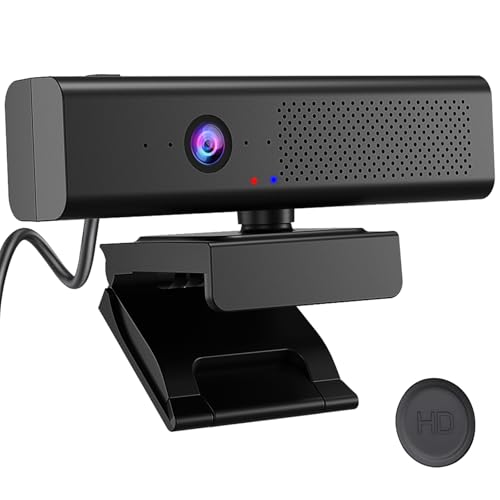
This 1080p model integrates a camera, quad-mic array, and a 3W speaker. It emphasizes a privacy shield and left-top mute control for quick privacy when needed. The quad-mic setup helps reduce background noise, making it suitable for busy workspaces or classrooms. It’s well-suited for Zoom or Teams meetings where a compact, all-in-one system is preferred. Choose this for straightforward, ready-to-use conferencing in mid-size rooms.
Why choose this
- Best for users who want strong background-noise suppression and privacy features in one device.
- Better for educational or training sessions with multiple participants speaking.
Caution: The microphone array focuses on voice rather than high-fidelity music playback; not ideal for music-focused uses.
WYRESTORM 4K Conference Room System

This 4K conference system targets medium to large rooms with AI auto framing and presenter tracking. It automatically centers participants and follows the active speaker, which reduces manual camera control during presentations. The system is designed to cover larger spaces with a 120° wide angle, a 5X zoom, and a four-microphone array plus dual speakers. It is ideal for formal meetings, lectures, or training sessions in professional environments.
Why choose this
- Best for medium-to-large conference rooms needing reliable AI framing and tracking.
- Better for presentations where smooth presenter-following enhances engagement.
Caution: Higher feature set may come with a steeper setup process; ensure compatibility with your existing room tech stack.
TOALLIN 4K Conference Webcam Bar

The TOALLIN 4K conference bar combines Ultra HD 4K video with built-in microphones and a speaker, offering AI auto-framing and speaker-tracking. This all-in-one design supports a centralized conference camera setup, making it suitable for larger rooms or spaces where a single device can anchor the system. The AI features help keep the active speaker in frame, reducing the need for manual camera adjustments. Best for organizations adopting single-camera room solutions.
Why choose this
- Best for rooms that benefit from a single-line device with AI tracking and minimal cabling.
- Better for formal meetings and presentations requiring clear speaker focus.
Caution: Like other all-in-one bars, it may require proper room placement to optimize field of view and audio pickup.
Buying Guide: Key Purchase Considerations
- Resolution and room size: Choose 4K for larger rooms or displays; 1080p is often enough for smaller spaces.
- AI tracking and auto framing: Look for systems that explicitly state active speaker tracking and real-time framing to reduce manual camera control.
- Audio quality: Prefer cameras with multiple mics and built-in speakers or plan for external audio if maximal fidelity is needed.
- Privacy features: A physical privacy cover or mute controls add security and peace of mind.
- Connectivity and compatibility: USB plug-and-play is ideal; confirm compatibility with Zoom, Google Meet, or Teams.
- Room acoustics: In noisy environments, models with strong noise reduction and echo cancellation perform better.
- Future-proofing: Consider 4K models if your display or content demands ultra-high resolution.
Frequently asked questions
- What is speaker-tracking in webcams? It is the ability of the camera to detect who is speaking and adjust framing to keep that person in view.
- Do I need special software for these cameras? Most are plug-and-play and work with common conferencing platforms without extra drivers.
- Is 4K necessary for video calls? Not always, but it helps when you use large displays or require sharper detail in presentations.
- Can one camera cover a large conference room? Some models offer wide-angle or auto-framing designed for mid-to-large spaces; check room dimensions before buying.
- Are built-in mics enough for meetings? They can be adequate for small rooms; for noisy spaces or large rooms, external mics or speakers may improve clarity.
- Is privacy important with these devices? Yes; many devices include privacy covers and mute controls to prevent unintended video or audio capture.