Looking for a camera that captures wider scenes for streaming or online meetings? The best options below emphasize wide fields of view, clear autofocus, and reliable audio. They suit content creators, educators, and professionals who need to include more of the surroundings or multiple people in frame. This guide highlights five strong choices with practical strengths and clear trade-offs.
| Product | Key Advantage | Best For | Notes |
|---|---|---|---|
| EMEET C60E Dual-Camera 4K Webcam | Dual cameras with 4K sensor and 11X hybrid zoom | Presenters needing full-scene + close-up views | Zoom not supported in 4K/60FPS modes |
| EMEET PIXY Dual-Camera AI-Powered PTZ Camera | AI tracking with two cameras and 310° pan/180° tilt | People-centric broadcasts requiring dynamic framing | AI features require software integration |
| Shcngqio 1080P HD Webcam | Wide-angle lens with noise-canceling mic | Budget setups needing clear voice and wide view | 1080p resolution (not 4K) |
| Angetube Wide Angle 4K Webcam | 120° FOV with PDAF autofocus | Large group calls or classrooms | 4K defaults to 1080p in some apps |
| Spedal 920 Pro Wide Angle Webcam | 120° wide-angle with 1080p and robust mic | Boardroom-style meetings and training | No native 4K support |
EMEET C60E Dual-Camera 4K Webcam

The EMEET C60E combines two cameras sharing one 1/2.8″ CMOS 4K sensor. The left wide-angle captures panoramic scenes, while the right telephoto delivers close-ups at approximately 13.8 inches. This setup enables seamless switching between full-scene and detail views during streaming, teaching, product demos, or remote meetings. Best for presenters who need both room-scale context and precise close-ups without moving the camera.
Key features include Max 11X hybrid zoom with PDAF autofocus to keep zoomed images sharp. The device supports remote control and EMEET STUDIO software for brightness, focus, and RGB lighting adjustments. Remote and studio software together offer flexible framing whether you’re streaming, recording, or teaching live. Consider this if you require quick transitions between wide and close shots in professional broadcasts.
Limitation: Zoom behavior is not supported in 4K, 60FPS, or YUY2 modes, which may affect some high-framerate workflows. The camera system is optimized for stable framing and efficient setup rather than continuous high-zoom video in every mode.
EMEET PIXY Dual-Camera AI-Powered PTZ Camera 4K

EMEET PIXY blends a 4K main camera with an auxiliary AI camera to optimize autofocus and exposure. It features 3-chip smoother intelligent tracking, which helps keep subjects centered as they move, making PIXY ideal for moving presenters, beauty streams, product demos, or online teaching. The built-in EMEET STUDIO software enables preset positions, whiteboard auto-detection, and privacy mode. This camera shines where consistent tracking and dynamic framing are critical.
Best for broadcasters who need reliable auto-tracking and stage-style framing. The AI components enable faster focus and better exposure adjustments during movement. The 310° pan/180° tilt range provides broad coverage for multi-person scenes. A caution: some advanced features rely on accompanying software; ensure compatibility with your streaming setup before purchase.
Shcngqio 1080P HD Webcam

The Shcngqio webcam delivers 1080p resolution with a wide-angle lens and a noise-canceling microphone. Automatic light correction helps maintain clear video in variable lighting conditions, making it a strong option for budget-conscious users who need solid image quality and clearer audio in daily video calls, teaching, or streaming. This model emphasizes simplicity and reliability for straightforward streaming setups.
Best for: budget-conscious buyers who want a wide field of view with dependable audio. Caution: it does not offer 4K resolution, which may matter for creators needing ultra-sharp detail.
Angetube Wide Angle 4K Webcam
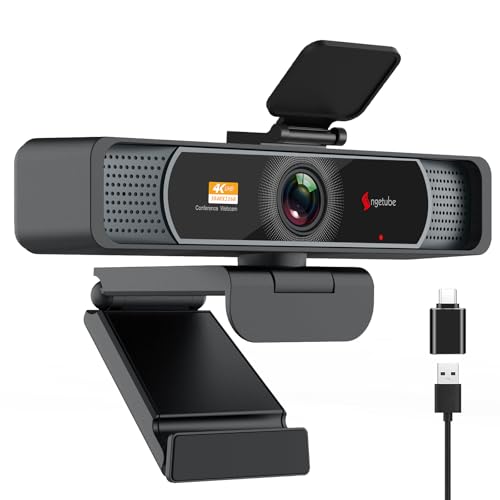
Angetube’s 4K webcam offers a 120° wide-angle field of view and PDAF autofocus for rapid, sharp focus. Dual microphones support clearer voice capture, while AI noise cancellation helps reduce background chatter. The camera supports 4K streaming, though some software defaults to 1080p and requires camera software or apps to enable 4K. This makes Angetube a solid pick for large-group calls or classrooms where breadth of scene is critical.
Choose this if you need broad coverage with decent autofocus and noise reduction. Caution: 4K may require enabling through software; otherwise, you may default to 1080p in certain apps.
Spedal 920 Pro Wide Angle Webcam

The Spedal 920 Pro emphasizes a 120° wide field and full HD 1080p streaming with built-in microphones tailored for conference rooms and training. It features 360° rotation and a 180° vertical range, enabling flexible positioning for boardrooms or classrooms. This model is well-suited for teams needing comprehensive coverage with straightforward setup.
Best for: multi-person meetings and training sessions where broad visibility is essential. Limitation: it does not advertise 4K resolution, focusing on solid 1080p performance and broad framing.
Buying Guide: Key Purchase Considerations
What resolution do you need? If you regularly stream in 4K, prioritize cameras like the C60E or Angetube that offer 4K capture and reliable autofocus. If you’re on a tighter budget or primarily do conference calls, 1080p models like Shcngqio or Spedal can still deliver crisp video with wide angles.
How important is tracking and framing? For dynamic presenters or moving hosts, AI tracking or PTZ features (as in PIXY) can save time and improve consistency. If you rarely move, a fixed wide-angle could be enough.
What about audio? Consider cameras with built-in noise-canceling mics or multiple mics to reduce ambient noise. In loud environments, better audio can be as important as video quality.
Software and compatibility matter. Some cameras rely on companion software (EMEET STUDIO, OBS integrations) for best performance. Ensure your streaming workflow supports the camera’s features before buying.
Mounting and space. Wide-angle cameras capture more surroundings, which can be advantageous in small studios or classrooms. Check whether the camera’s footprint and mounting options fit your setup.
Frequently Asked Questions
- What is a wide-angle streaming camera? A camera that uses a wide field of view to include more of the scene, useful for multi-person gatherings and teaching demonstrations.
- Do wide-angle cameras support 4K? Some models do (such as 4K-capable EMEET and Angetube cameras). Others are 1080p but still provide a wide view.
- What is PDAF autofocus? Phase Detection Auto Focus provides fast, accurate focus by measuring phase differences, helping keep subjects sharp during movement.
- Is dual-camera better than single-camera for streaming? Dual-camera setups offer different perspectives (wide and close-up) without repositioning, which can enhance production value.
- Do I need software to use these cameras? Many require or benefit from companion software for advanced features like whiteboard mode, privacy, or fine-tuning brightness and color.
- Can these cameras be used with popular streaming apps? Yes, most are compatible with OBS, Zoom, Teams, and other common platforms, though some features may require software activation.