Answering the demand for expansive, clear views in video meetings, these wide-angle webcams are ideal for small teams, classrooms, or home offices where multiple participants must be seen at once. This guide highlights five top options, detailing who each is best for, and why they stand out for wide-angle conference needs. Whether you need distortion-free visuals, AI auto-tracking, or strong noise suppression, there’s a model here to fit your space and workflow.
Summary of Selected Products
| Product | Best For | Key Benefit |
|---|---|---|
| Angetube Wide Angle 4K Webcam | Remote teams and presenters | 120° FOV with AI noise cancellation |
| WYRESTORM 4K AI Tracking | Small conference rooms | AI auto framing and presenter tracking |
| Spedal 120° Pro Webcam | Boardroom-style meetings | 360° rotation with 120° FOV |
| UGREEN 2K Webcam | Frequent video calls | 2K resolution with dual mics and auto-light |
| Meeteasy Panoramic 180° Cam | Huddle spaces and home offices | Dual mode with real-time tracking |
Angetube Wide Angle 4K Webcam
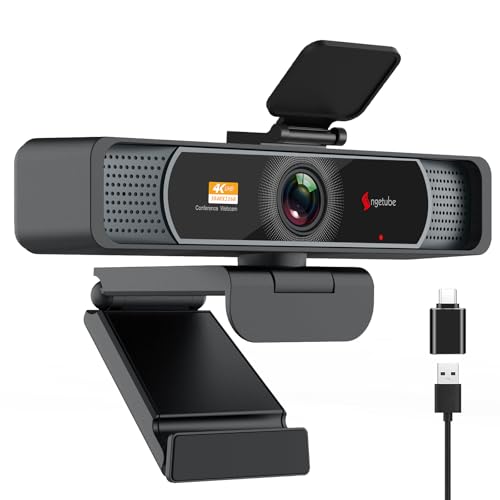
The Angetube webcam is designed for business meetings, remote learning, and streaming with a 120° wide field of view. It supports Ultra HD 4K at 30fps or 1080p at 60fps using a high-quality CMOS sensor. Default resolution is 1080p; 4K is accessible through camera software or apps like OBS. This model uses AI-assisted auto-focus (PDAF) for sharp images during movement and dual mics with AI noise cancellation to reduce ambient sounds. Best for: teams needing wide sightlines and clear voice in shared spaces where participants may be spread across a room. Caution: 4K mode requires compatible software and hardware, which may limit plug-and-play simplicity for some setups.
Shcngqio 1080P HD Webcam with Microphone

The Shcngqio 1080p webcam offers a wide-angle lens and built-in noise-canceling microphone, making it a solid choice for webinars, conferences, and online teaching. Automatic light correction helps maintain visibility in varying lighting conditions, from dim rooms to bright setups. Best for: users who need a straightforward, easy-to-use camera with reliable audio in mixed lighting. Caution: It emphasizes 1080p at 30fps; if you require higher frame rates, you may want to consider other options in this list.
WYRESTORM 4K AI Tracking Conference Webcam

This WYRESTORM model targets small conference rooms with AI auto-framing that ensures all participants are captured without crowding. It includes presenter tracking to follow active speakers, which is advantageous for trainings, presentations, and client meetings. Best for: compact spaces that still require dynamic framing. Caution: AI tracking performance depends on room lighting and background; inconsistent lighting can challenge tracking accuracy.
TONGVEO All-in-One Conference System

Although counted as a broader system, this option combines a 1080p AI auto-tracking camera with a Bluetooth speakerphone, creating a unified conference experience for small-to-medium rooms. Best for: spaces needing integrated audio and video for smoother single-venue meetings. Caution: the full system’s complexity may require more setup time than a standalone webcam.
Spedal 920 Pro Wide-Angle Webcam

Spedal’s 920 Pro emphasizes a 120° wide-angle field with a built-in microphone and a 360° rotation capability for flexible positioning. It’s designed for boardroom-style meetings and multi-person chats, delivering 1080p HD video. Best for: teams needing easy setup and broad room coverage without specialized software. Caution: rotation and field of view are fixed to certain ranges; extreme panning may introduce distortions if not carefully positioned.
Buying Guide: Key Considerations for Wide-Angle Conference Cameras
What matters most when selecting a wide-angle web camera for meetings?
- Field of view vs. distortion: A 120° FOV is common; ensure your space avoids fisheye-like distortion when people sit near the periphery.
- Auto-tracking and AI framing: For larger groups or presenter-led sessions, AI features help maintain focus on active speakers.
- Resolution and frame rate: Higher resolutions (4K) are useful for large displays or streaming, while 1080p with 60fps offers smooth video in standard setups.
- Microphones and audio processing: Dual mics and noise cancellation reduce background noise, important in shared spaces or busy environments.
- Plug-and-play vs. required software: Some cameras rely on OBS, Zoom, or the manufacturer’s app for optimal 4K; verify compatibility with your usual platforms.
- Lighting adaptability: Automatic light correction helps maintain visibility across varied lighting conditions.
- Mounting and positioning: Consider rotation range (360° or limited) and tripod or monitor clip compatibility for best room integration.
Frequently Asked Questions
- What is the ideal field of view for small meeting rooms?
A 120° wide-angle is typically effective for boardrooms and huddle spaces, capturing all participants without excessive distortion, provided seating arrangement allows it. - Is 4K useful for video conferencing?
4K offers higher detail on large displays, but many platforms and hardware default to 1080p. It’s beneficial if your software supports 4K and you need crisp content capture. - Are built-in microphones enough for medium-sized rooms?
Dual microphones with noise cancellation often suffice for small to medium rooms; consider external audio solutions if far-field pickup is essential. - Can I use these cameras with Mac and Windows?
All listed models support cross-platform use via USB and are compatible with common conferencing apps across macOS and Windows. - What should I look for in automatic lighting correction?
Look for cameras with adaptive exposure and color temperature tuning to handle mixed or changing lighting conditions.
Some models enable advanced features via bundled apps or popular platforms (OBS, Zoom, Teams). Others work well with basic USB webcam operation and core conference software.