Answering the need for cable-free camera setups, this guide highlights the best wireless USB camera adapters and related adapters to expand capabilities for streaming, conferencing, and mobile work. It showcases options for turning wired cameras wireless, enabling USB-C to USB-A connections, and adding charging or output versatility. This selection is tailored for professionals, students, and casual creators who want cleaner setups and flexible connectivity.
| Product | |||
|---|---|---|---|
| j5create JVW120 Wireless Extender | Wireless USB extender | Streaming and conferencing with USB cameras | Product Page |
| UGREEN 164FT Wireless USB C Transmitter & HDMI Receiver | Wireless USB-C to HDMI transmitter/receiver | Classroom/meeting rooms, large spaces | Product Page |
| ienza USB-C to USB-A Adapter (2-Pack) | USB-C to USB-A adapter | Connect USB-A cameras per newer devices | Product Page |
| Apple Lightning to USB Camera Adapter | Lightning to USB 3.0 camera adapter | iPad Pro photo/video transfer and USB peripherals | Product Page |
| Wahbite Apple Lightning to USB Camera Adapter with Charging Port | Lightning to USB camera adapter with power | Photo/video transfer plus charging for iOS devices | Product Page |
j5create JVW120 Wireless Extender

Best for: Streamers and conference-goers who want to move a USB camera off the desk and into a wireless setup. The JVW120 converts a wired USB camera into a wireless device with a range up to 82 feet (25 meters), reducing cable clutter and enabling flexible camera placement.
Why selected: It provides cable-free convenience and low-latency USB transmission for synchronized audio and video. This can simplify setups in small studios or home offices where space is limited. A potential limitation is lack of USB mouse/keyboard compatibility, so ensure your peripherals don’t rely on wired USB input.
UGREEN 164FT Wireless USB C Transmitter & HDMI Receiver

Best for: Large meeting rooms, classrooms, or home theaters needing long-range wireless video output from USB-C devices to HDMI displays. It supports 1080P@60Hz and features PD charging to maintain device power during prolonged use.
Why selected: The system delivers low-latency video transmission up to 164 feet (50 meters) with 5.8 GHz Wi‑Fi technology, ideal for expansive spaces. A caution: ensure no physical obstructions between transmitter and receiver for optimal performance; compatibility is focused on HDMI output via the receiver.
ienza USB-C to USB-A Adapter (2-Pack)

Best for: Users with USB-C devices who need to connect USB-A accessories like cameras, keyboards, or USB drives without replacing existing gear. The 2-pack provides flexibility for travel or multi-device setups.
Why selected: It enables plugging USB-A peripherals into modern USB-C devices, broadening compatibility. Limitation to note: it does not add power delivery; use separate charging if your device requires it during operation.
Apple Lightning to USB Camera Adapter

Best for: iPad Pro users who want to import photos/videos from cameras or transfer data to USB peripherals via a Lightning connection. It also enables USB 3.0 peripheral connections for faster data transfer.
Why selected: This adapter integrates smoothly with iOS devices for quick media transfer and supports USB peripherals beyond basic cameras. Caution: some users may require direct device power for high-demand peripherals, depending on usage.
Wahbite Lightning to USB Camera Adapter with Charging Port
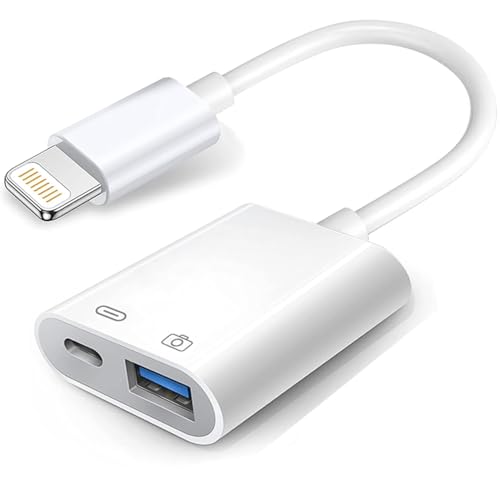
Best for: iPhone or iPad users who want to transfer media and power peripherals in a single solution. The charging port allows simultaneous data transfer and device charging, making it convenient for ongoing workflows.
Why selected: It provides USB 3.0 support with charging, enabling faster transfers up to 5Gbps and extending usability during long sessions. Limitation: ensure your charging setup supports the device’s power needs and that you’re using compatible USB peripherals.
Buying Guide
What should you consider when choosing a wireless USB camera adapter?
- Purpose and distance: If you need long-range wireless transmission for cameras, a dedicated wireless transmitter/receiver (like the UGREEN option) is preferable. For desk setups, a USB-C to USB-A adapter may suffice.
- Power and charging: Some adapters include PD charging or power passthrough. If your device or peripheral requires power while in use, choose models that support charging.
- Compatibility: Ensure the adapter matches your device ecosystem (USB-C, USB-A, Lightning). Check whether you need 1080p or higher resolutions and the required input/output type (HDMI, USB, etc.).
- Latency and reliability: Look for low-latency transmission for real-time video and audio, especially for conferencing or live streaming.
- Peripherals and peripherals limits: Some adapters do not support all USB devices or may have compatibility caveats with mice, keyboards, or storage devices.
Frequently Asked Questions
- What is the main benefit of a wireless USB camera adapter? – It eliminates cables between cameras and displays or capture devices, enabling flexible placement and cleaner setups.
- Can I use USB-C and USB-A devices together with these adapters? – Many adapters convert between USB-C and USB-A; verify each product’s stated compatibility for your devices.
- Do these adapters require drivers? – Most modern adapters are plug-and-play, but some may require drivers or specific software for full functionality.
- Is 1080p video sufficient for professional use? – 1080p is common and generally adequate for conferencing and streaming; higher resolutions require compatible transmitters/receivers and displays.
- Will wireless transmission affect audio sync? – Look for models advertising low-latency transmission to minimize audio-video sync issues.
- Are USB hubs compatible with these adapters? – Some adapters support USB peripherals through hubs, but performance may vary depending on power and bandwidth.