Finding a portable USB microscope that works seamlessly with Android devices is easier than you think. This guide highlights five Android-friendly options, detailing who they’re best for, what they do well, and any limitations to watch for. Whether you’re a student, hobbyist, or professional needing quick close-up views, these picks offer plug-and-play simplicity, solid image quality, and mobile-friendly connectivity. Use the quick reference table below to compare key points at a glance.
| Product | Best For | Key Benefit | Notes |
|---|---|---|---|
| KEEMIKA USB Digital Microscope | Students and field researchers | 50x-1600x zoom with +2MP sensor | Android 7.0+ or iOS 9.0+ required; no PC support |
| SKYBASIC Wireless Digital Microscope | hobbyists who want WiFi | 8 LED lights; WiFi connection to Android/iOS | Also works with Windows/Mac via USB |
| Bysameyee USB Microscope (40-1000X) | Education and coins/jewelry inspection | USB-powered; adjustable brightness | Not compatible with iPhone/iPad |
| Bysameyee 1080P USB Microscope with Stand | Teaching and lab work | 1080P HD visuals; 4-in-1 cable for broad device compatibility | OTG must be enabled; Windows/macOS/Android/USB-C, Lightning, Micro USB |
| Jiusion WiFi USB Digital Handheld Microscope | Kids and students exploring electronics | 4K-style capable WiFi with 8 LEDs | Best with mobile devices; PC connection optional |
KEEMIKA USB Digital Microscope (50x-1600x)

Best for on-the-go magnification with no PC required. KEEMIKA’s handheld design offers 50x-1600x digital magnification with a +2MP camera delivering 1920x1440P images and videos. The center wheel enables manual focus, and the integrated software provides three levels of digital zoom. This model is ideal for students or field researchers who want quick close-ups using an Android or iOS device, without a laptop. It does require the Sup-Anesok app for Android 7.0+ or iOS 9.0+ and a Type-C connection. A potential limitation is that it does not support USB Type-A PCs, so you’ll be focused on mobile use rather than desktop work.
Who this is best for: Anyone prioritizing truly mobile operation and high magnification on Android or iPhone, with straightforward plug-and-play setup.
SKYBASIC Wireless Digital Microscope (50x-1000x)

This wireless model connects to Android or iOS devices via its built-in WiFi hotspot. It also supports USB connection for Windows and Mac computers. With 8 adjustable LED lights and a 2MP CMOS sensor, you’ll get 1920×1080 image resolution on mobile and 720p on computers. It’s well-suited for classroom demos or home projects where a quick smartphone pairing is advantageous. A limitation is that the device relies on its own WiFi network, which can require reconnecting if you move rooms or networks during a session.
Who this is best for: Those who want wireless convenience and easy sharing from mobile devices, especially in teaching or group study settings.
Bysameyee USB Microscope (40-1000X) with LED

This USB microscope emphasizes a wide array of applications—from coin and jewelry inspection to PCB examination and textile scrutiny. It’s powered via USB and includes eight adjustable LEDs for clear illumination. It’s suitable for Windows-based measurement and capture, with a user-friendly software suite for photos and videos. A notable limitation is its compatibility: it does not support iPhone/iPad, so Android or Windows users have the best experience here.
Who this is best for: Users who need a versatile USB microscope for a range of tasks on Windows or Android, particularly education or hobby projects.
Bysameyee 1080P USB Microscope with Stand
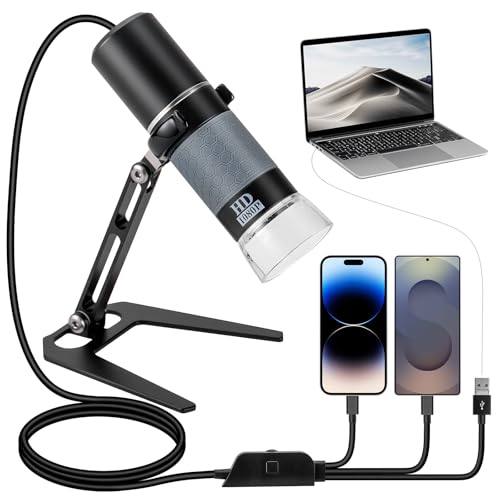
Equipped with a metal stand and a universal 4-in-1 USB cable, this model aims for broad compatibility across USB-C, Lightning, Micro-USB, and USB-A. It supports 1080P imaging and real-time viewing and recording for teaching or research. OTG must be activated to use the microscope on mobile devices. It’s a strong choice when you want a stable, hands-free setup for extended observation, especially in teaching labs or demonstrations.
Who this is best for: Educators or hobbyists who want a stable mounting option and broad device compatibility across mobile and desktop platforms.
Jiusion WiFi USB Digital Handheld Microscope

Jiusion offers a 4K-style 3840x2160P output over WiFi with eight LEDs and a metal stand, designed for iPhone, iPad, Android devices, and PCs. The device supports wireless operation with mobile devices and wired connection to a PC. It’s a solid option for students who want a general-purpose, kid-friendly microscope that can also be used on a computer for larger datasets. A potential limitation is that some users find the focus controls less intuitive on smaller screens, requiring some adjustment during use.
Who this is best for: Families or classrooms seeking a versatile, wireless microscope that works well with Android phones and tablets.
Buying Guide
Key considerations help ensure you pick a model that meets your Android workflow and budget.
- Device compatibility: Look for OTG support, USB-C or Type-C connections, and Android version requirements. Some models are not compatible with iPhones, iPads, or PCs.
- Connection type: Wireless (WiFi) vs. wired USB. Wireless offers mobility and easier sharing; USB often provides steadier connections and broader PC compatibility.
- Resolution and magnification: Higher megapixel sensors and up to 1000x-1600x magnification are ideal for detailed work, but consider lighting and focus performance at high zoom levels.
- Lighting: Built-in LEDs (8 or more) improve visibility in dark or reflective samples. Adjustable brightness helps reduce glare and improve color accuracy.
- Stability and stand options: A built-in or optional metal stand improves steady imaging and frees hands for fine focus adjustments.
- Software and app support: Android compatibility with the required app is essential. Ensure the app provides essential features like capture, video, and measurement if needed.
- Caveats and limitations: Some products do not support iOS or desktop operating systems; others rely on specific OTG settings or mobile-only use. Verify before buying if cross-platform use is important.
FAQ
- Do these microscopes work with Android without a PC? Yes. Most models connect directly via USB-C or OTG to Android devices, and several offer wireless smartphone connectivity.
- Can I use these for photography or video documentation? Yes. All listed models support image capture and video recording, with varying software capabilities depending on the device.
- Is a stand necessary for stable observation? A stand is highly recommended for steady focusing, especially at higher magnifications or during long observation sessions.
- Will these work on iPhones? Some do not support iOS; check compatibility before purchase. If iPhone compatibility is essential, choose models explicitly stated as iOS-compatible.
- What about measurement features? Some models offer measurement tools within Windows software or mobile apps. If measurement is critical, verify software compatibility and capability before buying.
- Are all devices 4K or higher? Not all; several offer HD or 1080P capture with high magnification. If 4K is important, look for models that explicitly state 4K output over WiFi or USB.