For a two-person video podcast, the best setup combines dual cameras, two reliable microphones, a capable audio interface, and practical stands or boom arms. This guide compares five top Amazon bundles that focus on two-person recordings, offering clear reasons who each option is best for and common limitations to consider.
Summary table of selected products
| Product | Best For | Key Benefit |
|---|---|---|
| Movo Video Podcast Equipment Bundle – USB Interface, 2 XLR Mics, 2 4K Cameras, 2 Boom Arms | Co-hosted shows with pro dual-camera angles | All-in-one dual-camera and dual-mic setup |
| Movo Video Podcast Equipment Bundle – USB Interface, 2 XLR Mics, 2 4K Cameras, 2 Desk Stands | Desk-based podcasting with compact footprint | Includes desk mic stands for a tidy desk setup |
| MAONO PD200W Hybrid Wireless Bundle for 2 | Freedom of wireless mic use | Three-way mic options with two wireless mics |
| RODECaster Video All-in-One Production Console Bundle | Integrated control for complex productions | Built-in video switching and multi-input audio control |
| Skytex Softbox Lighting Kit 2Pack | Consistent lighting for two-person shoots | Two softboxes with color temperature control |
Movo Video Podcast Bundle – 2 XLR Mics, 2 4K Cameras, 2 Boom Arms

The Movo bundle provides a complete, dual-camera video podcast setup designed for co-hosted discussions. It includes two XLR dynamic microphones, two 4K cameras, two boom arms, and a USB audio interface. Best for: co-hosted shows, interviews, and panel discussions where you want preconfigured versatility without buying gear piece by piece. Limitation: the included cameras and mics are optimized for general use; advanced filmmakers may want higher-end optics or additional lens options.
Movo Video Podcast Bundle – 2 XLR Mics, 2 4K Cameras, 2 Desk Stands
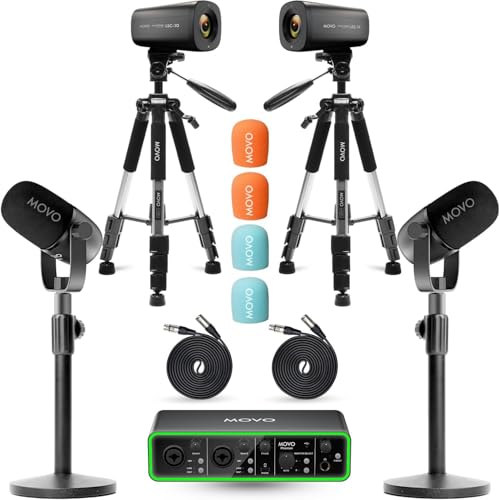
This variant mirrors the dual-camera concept but swaps in desk mic stands for a cleaner desk footprint. Best for: two people recording at a shared table or desk where a compact, non-boom mic stance is preferred. Limitation: desk stands may be less flexible than boom arms in small, dynamic spaces.
MAONO PD200W Hybrid Wireless Podcast Bundle for 2

This kit emphasizes wireless flexibility with two wireless receivers, plus USB and XLR options. Best for: two-person podcasts where mobility is valuable or when you want to minimize cable clutter. Limitation: wireless components may introduce latency or interference in crowded wireless environments; ensure compatibility with your devices.
RODECaster Video All-in-One Production Console Bundle

The Rode bundle combines a full production console with two podcast microphones, two headphones, and essential cables. Best for: producers who want integrated control over multiple video sources and a streamlined workflow. Limitation: higher complexity and cost; it targets more advanced producers or teams with frequent live streams.
Skytex Softbox Lighting Kit 2Pack

This lighting kit provides two 85W LED bulbs with remote-enabled color temperature control, two softboxes, stands, and a carry bag. Best for: two-person setups where even, flattering lighting is essential. Limitation: remote control requires separate batteries, and setup can take more time than single-light options.
Buying Guide
What to consider when choosing a two-person video podcast setup
- Camera configuration: Do you want two cameras for different angles, or a single camera with a wide shot? Dual 4K cameras deliver professional versatility but require more space and setup time.
- Microphone strategy: Do you prefer XLR for higher fidelity and upgradable preamps, or USB for plug-and-play simplicity? Hybrid bundles (like MAONO PD200W) offer flexibility with wireless options.
- Audio interface and mixer needs: If you plan to record two voices with separate tracks, ensure the interface supports dual inputs with phantom power if using condenser mics.
- Stand and mounting approach: Boom arms provide flexible mic placement but require space; desk stands are compact but less adjustable in crowded desks.
- Lighting quality: Two-point lighting gives consistent skin tones and reduces shadows. Ensure color temperature and brightness controls fit your space.
- Workflow and future-proofing: Consider whether you need an all-in-one console (like RODECaster) or modular components that allow future upgrades.
- Cables and organization: Bundles with cable management and labeled components help maintain a clean setup in busy studios or streaming rooms.
Frequently Asked Questions
- What is the best setup for two-person streaming on YouTube?
- Should I choose XLR or USB mics for a two-person podcast?
- Do I need a dedicated podcast mixer or a full production console?
- Is lighting essential for video podcasts?
- What’s a practical budget approach for beginners?
- Can these bundles be used with live-streaming platforms?
Two cameras, two mics, a reliable audio interface, and proper lighting generally yield the most professional results for YouTube streaming.
XLR mics offer higher fidelity and expandability, but USB mics are simpler and plug-and-play for beginners. A dual-XLR setup with a shared interface is common in professional rooms.
If you need advanced on-the-fly effects and multiple video sources, a production console like RODECaster is beneficial. For simpler workflows, a USB interface with a basic mixer often suffices.
Yes. Consistent lighting improves video quality and reduces post-production time by delivering clear, evenly lit footage of both hosts.
Start with a dual-camera bundle and two dynamic mics, add a solid audio interface, and then upgrade lighting as needed. This provides a balanced, scalable foundation.
Yes. Most bundles support streaming to common platforms; verify compatibility with your software and ensure your PC or capture card can handle live video plus audio processing.